

| Week | Meeting Dates (TR) | Topic | Notes | Assignments |
|---|---|---|---|---|
| Week 1 | Aug 26, Aug 28 | Course Overview, What is a Program?, First C++ Program | ||
| Week 2 | Sep 2, Sep 4 | Variables and Basic I/O | Sep 1 is Labor Day – no Monday classes | Lab/H2 #1 |
| Week 3 | Sep 9, Sep 11 | Branches | ||
| Week 4 | Sep 16, Sep 18 | Loops | Lab/H2 #2 | |
| Week 5 | Sep 23, Sep 25 | Array/Vectors | ||
| Week 6 | Sep 30, Oct 2 | User Defined Functions | Oct 3 is Fall Student Break | Lab/H2 #3 |
| Week 7 | Oct 7, Oct 9 | Objects and Classes | ||
| Week 8 | Oct 14, Oct 16 | Classes and Inheritance | Midterm Exam: Oct. 16th, Lab/HW2 #4 | |
| Week 9 | Oct 21, Oct 23 | Classes and Inheritance | ||
| Week 10 | Oct 28, Oct 30 | Data Streams | Lab/H2 #5 | |
| Week 11 | Nov 4, Nov 6 | Exceptions | ||
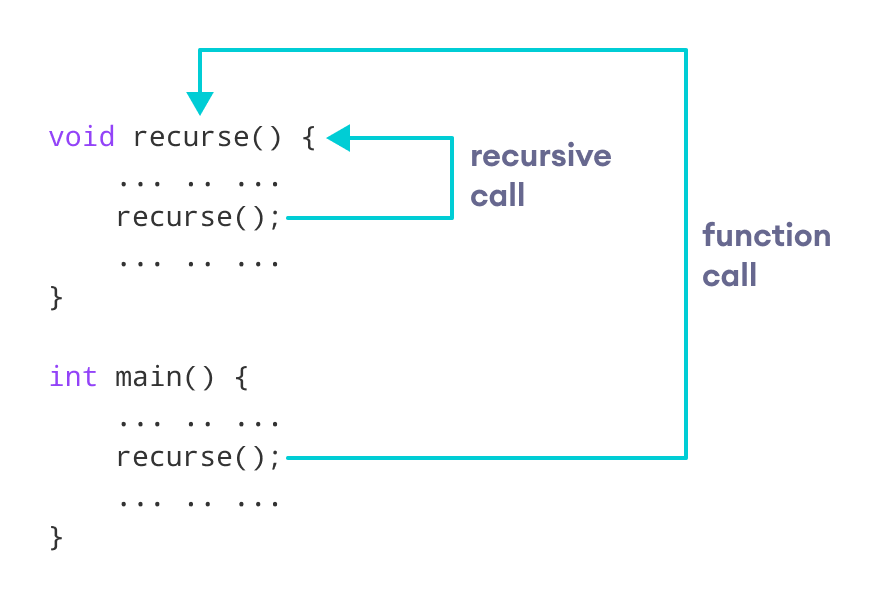
| Week 12 | Nov 11, Nov 13 | Recursion and Module Review | Lab/H2 #6 | |
| Week 13 | Nov 18, Nov 20 | Module Review | ||
| Week 14 |
Nov 25 |
Finals Preparation | No class Nov 27 | Lab/H2 #7 (due Nov 25) |
| Week 15 | Dec 2, Dec 4 | Final Review, Student Demos, Course Wrap-up | Final project presentations or quiz | |
| Week 16 | Dec 9 | Final Exam Period | Final Exam: Dec. 9th at 3PM in Baun 214 |

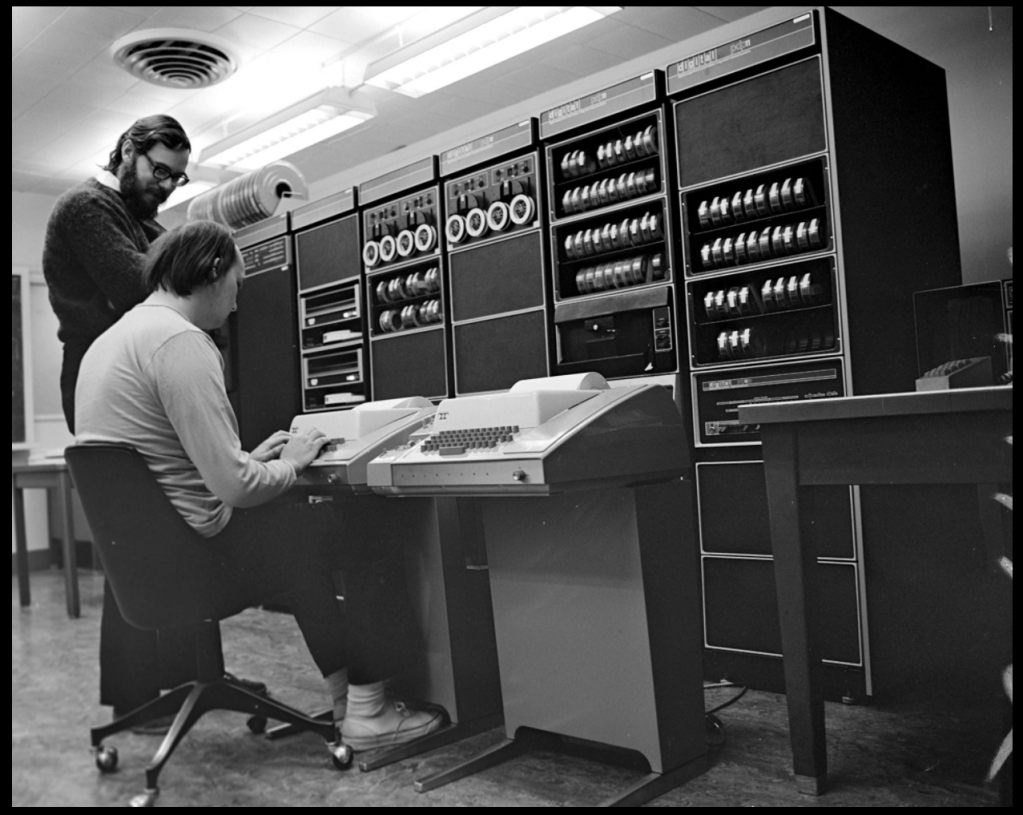
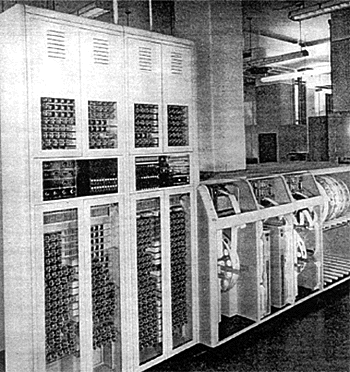
int add(int a, int b) {
    return a + b;
}
add:
    mov eax, edi    ; move a into eax
    add eax, esi    ; add b (esi) to eax
    ret             ; return result
x86-64 System V calling convention
55                ; push rbp
89 f8             ; mov eax, edi
01 f0             ; add eax, esi
5d                ; pop rbp
c3                ; ret
Compiled with gcc -O1 on x86-64
int add(int a, int b)
mov eax, edi
55 89 f8 01 f0 5d c3
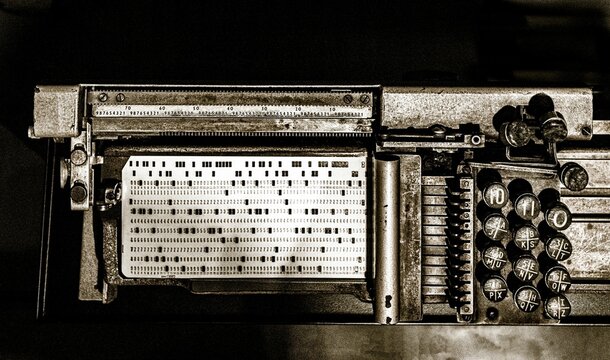
Source: Visualized compilation process from C to machine code
#include <stdio.h>

// Simulated function to start engine
void start_engine() {
    printf("Connecting to engine...\n");
    // Simulate hardware I/O or network call
    printf("Engine started successfully!\n");
}

int main() {
    start_engine();
    return 0;
}

#include <iostream>
int main(){
  int age;
  std::cout << "Age? ";
  std::cin >> age;
  std::cout << "You are " << age << "\n";
}int count = 5;
double pi = 3.14159;
char grade = 'A';
std::string name = "Alice";int a = 10, b = 3;
int sum = a + b;
int product = a * b;
double avg = (a + b) / 2.0;if (score >= 90) {
std::cout << "Excellent!";
} else {
std::cout << "Keep going!";
}for (int i = 1; i <= 5; ++i) {
std::cout << i << " ";
}int n = 5;
while (n > 0) {
std::cout << n-- << " ";
}int square(int x){ return x * x; }
int main(){ std::cout << square(5); }int nums[3] = {10, 20, 30};
for (int i = 0; i < 3; ++i)
std::cout << nums[i] << " ";#include <string>
std::string s = "Pacific";
std::cout << s.size();
std::cout << s[0];class Student {
public:
std::string name; int id;
};
Student s; s.name = "Bob"; s.id = 102;
#include <iostream>
using namespace std;

int main() {
    double a, b;
    char op;

    // TODO: read a, op, b
    // TODO: compute and print result

    return 0;
}
cout << "Enter expression (e.g., 5 * 2): ";
cin >> a >> op >> b;
switch (op) {
    case '+': cout << (a + b) << "\n"; break;
    case '-': cout << (a - b) << "\n"; break;
    case '*': cout << (a * b) << "\n"; break;
    case '/':
        if (b == 0) cout << "Error: division by zero\n";
        else cout << (a / b) << "\n";
        break;
    default:
        cout << "Unknown operator\n";
}
#include <iostream>
using namespace std;

int main() {
    double a, b;
    char op;

    cout << "Enter expression (e.g., 5 * 2): ";
    if (!(cin >> a >> op >> b)) {
        cout << "Input error\n";
        return 0;
    }

    switch (op) {
        case '+': cout << (a + b) << "\n"; break;
        case '-': cout << (a - b) << "\n"; break;
        case '*': cout << (a * b) << "\n"; break;
        case '/':
            if (b == 0) cout << "Error: division by zero\n";
            else cout << (a / b) << "\n";
            break;
        default:
            cout << "Unknown operator\n";
    }

    return 0;
}
#include <iostream>
#include <cstdlib>
#include <ctime>
using namespace std;
int main() {
    srand(time(0));
    int player, computer;
    cout << "Enter 0=Rock, 1=Paper, 2=Scissors: ";
    cin >> player;
    computer = rand() % 3;
cout << "Computer chose: " << computer << endl;
if(player == computer) cout << "Draw!\n";
else if((player==0 && computer==2) ||
        (player==1 && computer==0) ||
        (player==2 && computer==1))
    cout << "Player wins!\n";
else
    cout << "Computer wins!\n";
return 0;
// Optional: map numbers to names
string choices[] = {"Rock", "Paper", "Scissors"};
cout << "Player chose: " << choices[player] << ", Computer chose: " << choices[computer] << endl;
// Full program copy/paste
#include <iostream>
#include <cstdlib>
#include <ctime>
using namespace std;

int main() {
    srand(time(0));
    int player, computer;
    string choices[] = {"Rock", "Paper", "Scissors"};

    cout << "Enter 0=Rock, 1=Paper, 2=Scissors: ";
    cin >> player;
    computer = rand() % 3;

    cout << "Player chose: " << choices[player] << ", Computer chose: " << choices[computer] << endl;

    if(player == computer) cout << "Draw!\n";
    else if((player==0 && computer==2) ||
            (player==1 && computer==0) ||
            (player==2 && computer==1))
        cout << "Player wins!\n";
    else
        cout << "Computer wins!\n";

    return 0;
}
// Optional: loop for multiple rounds
for(int i=0;i<3;i++) {
    // repeat input, generate computer move, decide winner
}
// Optional: add input validation
if(player <0 || player >2) cout << "Invalid choice!\n";

int age = 18;
float price = 19.99;
double pi = 3.14159;
char grade = 'A';
bool passed = true;
string name = "Alice";
int score = 90;
cout << "Score: " << score;
int students = 25;
float height = 5.9f;
double salary = 50000.75;
char initial = 'B';
bool isActive = false;
string city = "Stockton";
// Correct variable
int number = 10;
cout << "Number: " << number;
string name = "John";
cout << "Hello, " << name;
int count;
float temperature;
double distance;
char letter;
bool isReady;
string message;
// Valid declaration
float temp;
temp = 36.5f;
cout << "Temperature: " << temp;
int x, y, z;
x = 5;
y = 10;
z = 15;
cout << x + y + z;
// Valid multiple declaration
int a, b, c;
a = 1; b = 2; c = 3;
cout << a + b + c;
int score, level;
score = 10;
level = 1;
cout << "Score: " << score << ", Level: " << level;
int age = 20;
float height = 5.8f;
double pi = 3.14159;
char grade = 'B';
bool isPassed = true;
string name = "Bob";
// Correct initialization
float y = 9.5;
cout << "Value: " << y;
int count = 10;
double distance = 12.5;
char initial = 'C';
bool done = false;
string city = "LA";
// Correct example
double distance = 12.5;
cout << "Distance: " << distance;
int age = 25;
float price = 19.99;
string name = "Alice";
cout << "Age: " << age << ", Price: " << price;
int score;
score = 95;
float temp;
temp = 36.6f;
char grade;
grade = 'A';
bool passed;
passed = true;
string name;
name = "Bob";
// Assignment example
int x;
x = 5;
cout << "X: " << x;
int a, b;
a = 10;
b = 20;
float temp, height;
temp = 36.5f;
height = 5.9f;
// Multiple assignment example
int a, b;
a = 5;
b = 10;
cout << a + b;
string name;
name = "Alice";
int age;
age = 25;
cout << name << " is " << age << " years old";
int score = 50;
score = 75;
float temp = 36.5f;
temp = 37.0f;
char grade = 'B';
grade = 'A';
bool passed = false;
passed = true;
string name = "Bob";
name = "Alice";
// Reassignment example
int x = 5;
x = 10;
cout << x;
int score = 50;
score = 70;
score = 90;
cout << "Final score: " << score;
// Multiple reassignment
int x = 10;
x = 20;
x = 30;
cout << x;
int score = 50;
score = 75;
score = 100;
cout << "Final Score: " << score;
John is 21 years old. Define a variable to store his age and initialize it with the correct value.
// Define variable type and initialize
The room temperature is 23.5 degrees Celsius. Create a variable to store the temperature.
// Define variable type and initialize
The student received a grade 'A' in the exam. Define a variable to store the grade.
// Define variable type and initialize
#include <iostream>
using namespace std;

int main() {
    cout
        << "Size of int: "
        << sizeof(int)
        << " bytes\n";
}
#include <iostream>
using namespace std;

int main() {
    cout
        << "Size float: "
        << sizeof(float)
        << " bytes\n";
}
#include <iostream>
using namespace std;

int main() {
    cout
        << "Size of double: "
        << sizeof(double)
        << " bytes\n";
}
#include <iostream>
using namespace std;

int main() {
    cout
        << "Size of char: "
        << sizeof(char)
        << " bytes\n";
}
#include <iostream>
using namespace std;

int main() {
    cout
        << "Size of bool: "
        << sizeof(bool)
        << " bytes\n";
}
#include <iostream>
#include <string>
using namespace std;

int main() {
    string name = "Alice";
    cout
        << "Size of string object: "
        << sizeof(name)
        << " bytes\n";
}
const double PI = 3.14159;
const int MAX_STUDENTS = 50;
cout << "PI: " << PI << ", Max: " << MAX_STUDENTS;
unsigned int count = 100;
long distance = 100000L;
short smallNumber = 10;
cout << count << ", " << distance << ", " << smallNumber;
int x = 10;
double y = (double)x; // explicit cast
float z = x;           // implicit cast
cout << y << ", " << z;
int age;
cout << "Enter your age: ";
cin >> age;
cout << "Your age is: " << age;
int globalVar = 100; // global

void func() {
    int localVar = 50; // local
    cout << localVar;
}

int main() {
    cout << globalVar;
    func();
}
int a;       // may have garbage value
float b;     // may have garbage
int c = 0;   // safe initialization
float d = 0; // safe initialization
enum Color { RED, GREEN, BLUE };
Color c = RED;
cout << c; // prints 0 for RED
int x = 10;
int* ptr = &x; // pointer stores address of x
cout << "Address: " << ptr;
cout << "Value: " << *ptr;
#include <iostream>
using namespace std;

int main() {
    int age;
    cout << "Enter your age: ";
    cin >> age;
    cout << "Your age is " << age;
}
#include <iostream>
#include <string>
using namespace std;

int main() {
    int age;
    float height;
    string name;

    cout << "Enter name, age, height: ";
    cin >> name >> age >> height;

    cout << name << " is " << age << " years old, "
         << height << " m tall";
}
#include <iostream>
using namespace std;

int main() {
    int x = 10, y = 20;
    cout << "X = " << x << endl;
    cout << "Y = " << y << endl;
    cout << "Sum = " << (x+y) << endl;
}
#include <iostream>
using namespace std;

int main() {
    int age;
    cout << "Enter age: ";
    cin >> age;

    if(cin.fail()) {
        cout << "Invalid input!";
    } else {
        cout << "Age: " << age;
    }
}
#include <iostream>
#include <string>
using namespace std;

int main() {
    string fullName;
    cout << "Enter full name: ";
    getline(cin, fullName);
    cout << "Hello, " << fullName;
}
// Example of descriptive names
int age = 20;
float heightInMeters = 1.75;
bool isRegistered = true;
// Valid names
int _count;
float totalAmount;
// Invalid names
// int 2ndValue;
// char first-name;
age and Age are different
int age = 20;
int Age = 30; // separate variable
temp or val
int s;         // unclear
int score;     // clear
float t;       // unclear
float temperature; // clear
totalAmounttotal_amountTotalAmount (commonly for classes)
// camelCase
int studentCount;
// snake_case
int student_count;
// PASCALCase (class example)
class StudentInfo {};
is, has, can
bool isRegistered = true;
bool hasAccess = false;
bool canVote = true;

if(isRegistered) {
    cout << "User registered.";
}
int, float, class, return
// Invalid
// int class = 10;
// float return = 5.5;
// Valid
int classCount;
float returnValue;
x, y)totalSumOfMonthlyTransactions)totalSum)
int x;               // bad
int totalSumOfMonth; // too long
int totalSum;        // good
g_)
int g_totalUsers = 0; // global
void registerUser() {
    int localScore = 0; // local
}
int score = 0;
float temperature = 0.0f;
bool isActive = false;
string name = "";
char grade = 'A';
const double PI = 3.14159;
const int MAX_USERS = 50;
cout << "PI: " << PI << ", Max: " << MAX_USERS;
unsigned int count = 100;
long distance = 100000L;
short smallNumber = 10;
cout << count << ", " << distance << ", " << smallNumber;
(double)x
int x = 10;
double y = (double)x; // explicit cast
float z = x;           // implicit cast
cout << y << ", " << z;
int g_counter = 0; // global
void func() {
    int localCounter = 5; // local
    cout << localCounter;
}
cout << g_counter;
// Example
int studentCount = 50;
bool isRegistered = true;
const int MAX_USERS = 100;
float temperature = 36.5f;
Today's topic: Variables in C++. Teams will compete in quizzes, coding relays, and challenges!
Form 2–3 teams (3–5 members each). Pick a team name and captain.
Team Red: 0 | Team Blue: 0 | Team Green: 0
A variable stores data that can change during program execution.
// Declare an integer named 'age'
// Declare int, float, char in one line
Which statement is correct?
What is the default value of an uninitialized bool in C++?
Which type has higher precision?
Which is correct to store only positive values?
// Swap a=5, b=10 using arithmetic
int x = 5;
{
  int x = 10;
}
cout << x;
What happens if a local variable has the same name as a global variable?
What is the type of int x = 5; double y = x;?
Which line reads an integer from the user?
// Swap x=3 and y=5 using a temporary variable
5 quick questions: each worth +5 points.
int x = 5;
{
    int x = 10;
}
cout << x;
When to use constants vs variables?
Team Red: __ | Team Blue: __ | Team Green: __
Mixed questions on all topics.
Identify and fix the syntax error in this code.
int main() {
    int x
    x = 10;
    cout << x;
    return 0;
}
This code may crash. Find the problem and fix it.
int main() {
    int a = 5, b = 0;
    int c = a / b;
    cout << c;
    return 0;
}
The program prints incorrectly. Fix the variable scope.
int main() {
    if (true) {
        int x = 10;
    }
    cout << x;
    return 0;
}
Homework 1 and Lab 1 details shared with teams.
Congratulations to the winning team!

bool paperTrayFull = true;
if (paperTrayFull) {
    cout << "Ready to print";
}bool printerOnline = false;
if (printerOnline) {
cout << "Sending print job...";
} else {
cout << "Printer offline!";
}bool tonerAvailable = true;
if (tonerAvailable) {
cout << "Printing document...";
} else {
cout << "Refill toner first";
}string paperType = "A4";
if (paperType == "A4") {
cout << "Proceed with print";
} else {
cout << "Insert correct paper size";
}bool printerJam = true;
if (printerJam) {
cout << "Clear the jam first";
} else {
cout << "Ready to print";
}bool inkLow = true;
if (inkLow) {
cout << "Warning: Refill ink";
} else {
cout << "Ink level sufficient";
}bool jobQueued = true;
if (jobQueued) {
cout << "Processing queued job";
} else {
cout << "No jobs pending";
}bool coverClosed = false;
if (coverClosed) {
cout << "Printer ready";
} else {
cout << "Close the cover";
}int selectedTray = 1;
if (selectedTray == 1) {
cout << "Tray 1 selected";
} else if (selectedTray == 2) {
cout << "Tray 2 selected";
} else {
cout << "Invalid tray";
}bool printerReady = true;
if (printerReady) {
cout << "Ready for print job";
} else {
cout << "Printer not ready";
}bool printerJam = true;
if (printerJam) {
cout << "Clear the jam first";
} else {
cout << "Printer ready";
}bool coverClosed = false;
if (coverClosed) {
cout << "Printer ready";
} else {
cout << "Close the cover";
}int selectedTray = 1;
if (selectedTray == 1) {
cout << "Tray 1 selected";
} else if (selectedTray == 2) {
cout << "Tray 2 selected";
} else {
cout << "Invalid tray";
}bool tray1Full = true;
bool tray2Full = false;
if (tray1Full) {
cout << "Using tray 1";
} else if (tray2Full) {
cout << "Using tray 2";
} else {
cout << "No paper loaded";
}bool networkConnected = true;
if (networkConnected) {
cout << "Connected to printer";
} else {
cout << "Cannot reach printer";
}bool queueEmpty = false;
if (!queueEmpty) {
cout << "Processing jobs...";
} else {
cout << "No jobs in queue";
}bool paperFull = true;
bool tonerOk = false;
if (paperFull && tonerOk) {
cout << "Starting batch print";
} else {
cout << "Check paper or toner";
}bool printerReady = true;
if (printerReady) {
cout << "Ready for print job";
} else {
cout << "Printer not ready";
}bool paperTrayFull = true;
if (paperTrayFull) {
cout << "Printing...";
} else {
cout << "Add paper to tray";
}bool cardValid = false;
if (cardValid) {
cout << "Door opens";
} else {
cout << "Access denied";
}bool doorClosed = true;
if (doorClosed) {
cout << "Starting wash cycle...";
} else {
cout << "Close door first";
}int temp = 68;
if (temp < 70) {
cout << "Heating ON";
} else if (temp > 75) {
cout << "Cooling ON";
} else {
cout << "System idle";
}char light = 'Y';
if (light == 'G') {
cout << "Go";
} else if (light == 'Y') {
cout << "Slow down";
} else if (light == 'R') {
cout << "Stop";
} else {
cout << "Invalid signal";
}bool milkExpired = true;
if (milkExpired) {
cout << "Replace milk";
} else {
cout << "Milk is good";
}bool pinCorrect = false;
if (pinCorrect) {
cout << "Access granted";
} else {
cout << "Incorrect PIN";
}int requestedFloor = 5;
int currentFloor = 3;
if (requestedFloor > currentFloor) {
cout << "Going up";
} else if (requestedFloor < currentFloor) {
cout << "Going down";
} else {
cout << "Already there";
}bool waterFull = true;
bool beansFull = false;
if (waterFull && beansFull) {
cout << "Brewing coffee...";
} else {
cout << "Refill water or beans";
}bool keyValid = true;
if (keyValid) {
cout << "Door unlocked";
} else {
cout << "Access denied";
}int temp = 75;
if (temp > 70) {
cout << "Turn on AC";
} else {
cout << "AC off";
}int score = 82;
if (score >= 90) {
cout << "A";
} else if (score >= 75) {
cout << "B";
} else if (score >= 60) {
cout << "C";
} else {
cout << "Fail";
}if (isReady) {
cout << "Ready";
} else {
cout << "Not ready";
}bool active = true;
if (active = false) { // ❌ mistake
cout << "Inactive";
}// Example: Decide printer mode
int mode = 2;
if (mode == 1) {
cout << "Print B&W";
} else if (mode == 2) {
cout << "Print Color";
} else {
cout << "Unknown mode";
}bool hasPaper = true;
bool tonerOk = false;
if (hasPaper) {
if (tonerOk) {
cout << "Ready to print";
} else {
cout << "Replace toner";
}
} else {
cout << "Add paper";
}bool paper = true;
bool toner = true;
if (paper && toner) {
cout << "Printing...";
} else {
cout << "Cannot print";
}if (isConnected && hasJob) {
cout << "Processing job";
}// Example: Printer toner check
int tonerLevel = 5;
if (tonerLevel < 3) {
cout << "Refill toner";
} else if (tonerLevel <= 7) {
cout << "Toner ok";
} else {
cout << "Check sensor";
}bool ready = true;
if (ready) {
cout << "Go";
} else {
cout << "Wait";
}int mode = 2;
switch(mode) {
case 1: cout << "Print B&W"; break;
case 2: cout << "Print Color"; break;
default: cout << "Unknown mode";
}char option = 'B';
switch(option) {
case 'A': cout << "Option A"; break;
case 'B': cout << "Option B"; break;
default: cout << "Invalid option";
}char grade = 'B';
switch(grade) {
case 'A':
case 'B': cout << "Pass"; break;
case 'C': cout << "Consider"; break;
default: cout << "Fail";
}enum Mode { BW=1, COLOR=2 };
Mode m = COLOR;
switch(m) {
case BW: cout << "B&W"; break;
case COLOR: cout << "Color"; break;
}int printerMode = 3;
switch(printerMode) {
case 1: cout << "B&W"; break;
case 2: cout << "Color"; break;
case 3: cout << "Draft"; break;
case 4: cout << "High Quality"; break;
default: cout << "Invalid mode";
}char c = 'A';
switch(c) {
case 'A':
case 'B': cout << "Good"; break;
case 'C': cout << "Average"; break;
}int option = 5;
switch(option) {
case 1: cout << "Option 1"; break;
case 2: cout << "Option 2"; break;
default: cout << "Unknown option";
}int x = 2;
switch(x) {
case 1: cout << "One";
case 2: cout << "Two"; // Falls through to next case
case 3: cout << "Three";
}enum PrinterMode { BW=1, COLOR=2, DRAFT=3 };
PrinterMode mode = DRAFT;
switch(mode) {
case BW: cout << "B&W"; break;
case COLOR: cout << "Color"; break;
case DRAFT: cout << "Draft"; break;
default: cout << "Unknown";
}char opt = 'C';
switch(opt) {
case 'A': cout << "Option A"; break;
case 'B': cout << "Option B"; break;
case 'C': cout << "Option C"; break;
default: cout << "Unknown";
}// Example concept
// A simple if/else has 2 paths
bool ready = true;
if (ready) {
    cout << "Go";
} else {
    cout << "Wait";
}// Simple function
int max(int a, int b) {
if (a > b) return a;
else return b;
}bool paper = true;
bool toner = true;
bool connected = true;
if (paper && toner && connected) {
cout << "Ready to print";
} else {
cout << "Cannot print";
}// Nested example
if (paper) {
if (toner) {
if (connected) {
cout << "Ready";
}
}
}// Refactor example
bool readyToPrint(bool paper, bool toner) {
return paper && toner;
}
// Overview: Start -> Middle -> Finish
// Player chooses moves
// Rules:
// Positions: START = 0, MIDDLE = 1, FINISH = 2
// Player input determines horse move
const int START = 0;
const int MIDDLE = 1;
const int FINISH = 2;
int horsePos = START;
int choice;
cout << "Horse Race Game!" << endl;
cout << "Horse starts at the beginning." << endl;
cout << "Horse: H _ _" << endl;
cout << "Choose: 1=Move, 2=Quit" << endl;
cin >> choice;
if (choice == 1) {
    horsePos = MIDDLE;
    cout << "Horse moved to the middle!" << endl;
    cout << "Horse: _ H _" << endl;
} else {
    cout << "You quit the race." << endl;
    return 0;
}
// horsePos = START / MIDDLE / FINISH
cout << "Choose: 1=Move, 2=Quit" << endl;
cin >> choice;
switch(choice) {
    case 1:
        horsePos = FINISH;
        cout << "Horse: _ _ H" << endl;
        cout << "You reached finish line!" << endl;
        break;
    case 2:
        cout << "You quit the race." << endl;
        break;
    default:
        cout << "Invalid input." << endl;
}
if (horsePos == FINISH) {
    cout << "Congratulations! You won!" << endl;
}
else {
    cout << "You quit the race. Game over." << endl;
}
// switch(choice) { case 1: ... case 2: ... }
// Start: H _ _
// Middle: _ H _
// Finish: _ _ H
horsePos = MIDDLE;
cout << "Horse: _ H _" << endl;
horsePos = FINISH;
cout << "Horse: _ _ H" << endl;
cout << "🏆 You won the race!" << endl;
if(choice == 2) {
    cout << "You quit the race. Game over." << endl;
}
// Pseudocode
// choice1 -> if/else -> horsePos = MIDDLE
// choice2 -> switch -> horsePos = FINISH / Quit
horsePos = MIDDLE; // updates horse position
const int START = 0;
const int MIDDLE = 1;
const int FINISH = 2;



for (int i = 1; i <= 5; i++) {
    cout << "Count: " << i << endl;
}int x = 1;
while (x <= 5) {
cout << "x = " << x << endl;
x++;
}int choice;
do {
cout << "1=Play, 2=Quit" << endl;
cin >> choice;
} while (choice != 2);
for (int r = 1; r <= 3; r++) {
    for (int c = 1; c <= 3; c++) {
        cout << "(" << r << "," << c << ")";
    }
    cout << endl;
}break → exits loop earlycontinue → skips to next iterationfor (int i = 1; i <= 5; i++) {
if (i == 3) continue; // skip 3
if (i == 5) break; // stop at 5
cout << i << " ";
}// Infinite loop: forgot i++
for (int i = 0; i < 5; ) {
cout << i << " ";
}
// Off-by-one error
for (int i = 0; i <= 5; i++) {
cout << i << " "; // Prints 0–5 instead of 0–4
}
Which loop guarantees at least one execution?
int x = 0;
for (int i = 1; i <= 5; i++) {
    x = x + i;
}
int y = 1;
int i = 1;
while (i <= 4) {
    y = y * 2;
    i = i + 1;
}
int count = 0;
for (int i = 10; i > 0; i -= 2) {
    count = count + 1;
}
int z = 100;
do {
    z = z - 20;
} while (z > 50);
int sum = 0;
for (int i = 1; i <= 3; i++) {
    for (int j = 1; j <= 2; j++) {
        sum = sum + 1;
    }
}
// Print an 8x8 chessboard
for (int row = 0; row < 8; row++) {
    for (int col = 0; col < 8; col++) {
        if ((row + col) % 2 == 0)
            cout << "W "; // White square
        else
            cout << "B "; // Black square
    }
    cout << endl;
}
W B W B W B W B
B W B W B W B W
W B W B W B W B
B W B W B W B W
W B W B W B W B
B W B W B W B W
W B W B W B W B
B W B W B W B W
.jpg)

#include <iostream>
#include <string>
using namespace std;

int main() {
    string flower1 = "Rose";
    string flower2 = "Tulip";
    string flower3 = "Lily";

    cout << flower1 << endl;
    cout << flower2 << endl;
    cout << flower3 << endl;
}
#include <iostream>
#include <string>
using namespace std;

int main() {
    string flowers[3] = {"Rose", "Tulip", "Lily"};
    cout << flowers[0]; // Rose
}
flowers[1] = "Orchid";
cout << flowers[1]; // Orchid
What will this code output?
string flowers[3] = {"Rose", "Tulip", "Lily"};
cout << flowers[2];
for(int i = 0; i < 3; i++) {
    cout << flowers[i] << endl;
}
string flowers[3] = {"Rose", "Tulip", "Lily"};
double prices[3] = {2.99, 1.99, 3.49};

cout << flowers[0]
     << " costs $"
     << prices[0];
int sales[2][3] = {
   {10, 15, 12}, // Roses
   { 8, 11,  9}  // Tulips
};

cout << sales[0][1]; // 15
int sizes[4] = {5, 6, 7, 8};
int count = sizeof(sizes) / sizeof(sizes[0]);
cout << "Total flowers: " << count;
int inventory[3] = {20, 15, 10};
inventory[0] = 0;
cout << inventory[0]; // 0
What is the output of this code?
string flowers[3] = {"Rose", "Tulip", "Lily"};
flowers[2] = "Daisy";
cout << flowers[2];
string flowers[2] = {"Rose", "Tulip"};
double prices[2] = {2.99, 1.99};
int stock[2] = {12, 18};

cout << flowers[1] << " costs $"
     << prices[1] << " with "
     << stock[1] << " in stock.";
void printFlowers(string arr[], int size) {
    for(int i=0; i<size; i++) {
        cout << arr[i] << endl;
    }
}

string flowers[3] = {"Rose","Tulip","Lily"};
printFlowers(flowers, 3);
Which statement about arrays in C++ is TRUE?
int main() {
    char board[3] = {'_', '_', '_'};

    board[0] = 'X'; // Player 1
    board[1] = 'O'; // Player 2
    board[2] = 'X'; // Player 1

    for(int i=0; i<3; i++) {
        cout << board[i] << " ";
    }
    // Output: X O X
}
#include <vector>
#include <string>
using namespace std;

vector<string> flowers;
vector<string> flowers;
flowers.push_back("Rose");
flowers.push_back("Tulip");
flowers.push_back("Lily");
Which method adds a new flower to the end of a vector?
cout << flowers[0]; // Rose
flowers[1] = "Orchid";
for(int i=0; i<flowers.size(); i++) {
    cout << flowers[i] << endl;
}
Which function returns the number of elements in a vector?
flowers.pop_back(); // removes "Lily"
vector<string> flowers = {"Rose", "Tulip"};
vector<double> prices = {2.99, 1.99};

cout << flowers[0]
     << " costs $"
     << prices[0];
What happens if you call pop_back() on a vector?
vector<int> stock = {12, 8, 15};
stock[1] = 10; // update Tulip stock
for(string f : flowers) {
    cout << f << endl;
}
Which loop style automatically iterates through all vector elements?
// Example: Array (fixed size)
string flowers[3] = {"Rose", "Tulip", "Lily"};

// Example: Vector (dynamic size)
vector<string> flowers = {"Rose", "Tulip"};
flowers.push_back("Lily");


| Feature | Array | Vector |
|---|---|---|
| Size | Fixed at compile time | Dynamic, can grow or shrink |
| Declaration | int quantities[5]; | vector<int> quantities; |
| Adding elements | Cannot add beyond declared size | Use push_back() to add elements |
| Removing elements | Not possible | Use pop_back() to remove last element |
| Memory | Contiguous memory, static | Contiguous memory, resizes dynamically |
| Access | Use index: quantities[0] |
Use index: quantities[0] |
| Use case example | Flower types fixed: 3 types | Inventory can grow: add new flower types |
char board[3][3];
char currentPlayer = 'X';
bool gameOver = false;if (board[row][col] == ' ') {
board[row][col] = currentPlayer;
} else {
cout << "Invalid move!";
}
if (checkWin(board, currentPlayer)) gameOver = true;while (!gameOver) {
printBoard(board);
getPlayerMove();
updateBoard();
checkWinOrDraw();
switchPlayer();
}board[0][0] = 'X';
char cell = board[1][2];#include <vector>
vector<pair<int,int>> moves;
moves.push_back(make_pair(row, col));void printBoard(char board[3][3]) {
for (int i=0; i<3; i++) {
for (int j=0; j<3; j++) {
cout << board[i][j] << ' ';
}
cout << endl;
}
}bool checkWin(char board[3][3], char player) {
// check rows, columns, diagonals
for (int i=0; i<3; i++) {
if (board[i][0]==player && board[i][1]==player && board[i][2]==player) return true;
if (board[0][i]==player && board[1][i]==player && board[2][i]==player) return true;
}
if (board[0][0]==player && board[1][1]==player && board[2][2]==player) return true;
if (board[0][2]==player && board[1][1]==player && board[2][0]==player) return true;
return false;
}while (!gameOver) {
printBoard(board);
int row, col;
cout << "Enter row and column: ";
cin >> row >> col;
if (board[row][col]==' ') {
board[row][col] = currentPlayer;
if (checkWin(board, currentPlayer)) {
cout << currentPlayer << " wins!\n";
gameOver = true;
} else {
switchPlayer();
}
} else {
cout << "Invalid move!\n";
}
}
// Function declaration
int sum(int a, int b);// Example function signatures
int add(int a, int b);
void displayScore(int score);
double calculateAverage(double total, int count);int sum(int a, int b) {
return a + b;
}int result = sum(5, 3);
cout << result; // Outputs 8void greet(string name) {
cout << "Hello, " << name;
}int square(int x) {
return x * x;
}void printHello() {
cout << "Hello World";
}int sum(int a,int b);
double sum(double x,double y);int add(int a, int b=5) {
return a+b;
}inline int cube(int x) {
return x*x*x;
}int fact(int n) {
if(n<=1) return 1;
return n*fact(n-1);
}void update(int x) {
x = x+5;
}void update(int &x) {
x = x+5;
}void display(const string &s) {
cout << s;
}template
T add(T a,T b){return a+b;} static void helper() {
cout << "Helper function";
}int (*fp)(int,int) = sum;
cout << fp(2,3);// Examples of all function types
void f1();
int f2(int x);
inline int f3(int y);// Answer: void// Answer: Yes// Answer: B) Multiple types#include <iostream>
using namespace std;
// Example function skeletons
int calculateScore(int kills, int coins);
void displayHealth(int health);
bool hasWon(int score);
int main() {
// Call your functions here
}
printWelcome()generateSecret(int min, int max)getPlayerGuess()checkGuess(int secret, int guess)printHint(int secret, int guess)printResult(bool isCorrect)askPlayAgain()printGoodbye()printScore(int score)updateScore(int score, bool correct)main()
#include <iostream>
#include <cstdlib> // for rand() and srand()
#include <ctime> // for time()
using namespace std;
void printWelcome() {
cout << "Welcome!" << endl;
cout << "Number Guessing Adventure!" << endl;
}
int generateSecret(int min, int max) {
return rand() % (max - min + 1) + min;
}
int getPlayerGuess() {
int guess;
cout << "Enter your guess: ";
cin >> guess;
return guess;
}
bool checkGuess(int secret, int guess) {
return guess == secret;
}
void printHint(int secret, int guess) {
if (guess < secret) cout << "Too low!";
else if (guess > secret) cout << "Too high!";
}
void printResult(bool isCorrect) {
if (isCorrect) cout << "Correct! You guessed it!";
}
bool askPlayAgain() {
char choice;
cout << "Play again? (y/n): ";
cin >> choice;
return choice == 'y' || choice == 'Y';
}
void printGoodbye() {
cout << "Thanks for playing! Goodbye!" << endl;
}
void printScore(int score) {
cout << "Your current score: " << score << endl;
}
int updateScore(int score, bool correct) {
if (correct) return score + 1;
return score;
}
int main() {
srand(time(0));
int score = 0;
printWelcome();
bool playing = true;
while (playing) {
int secret = generateSecret(1, 100);
bool correct = false;
while (!correct) {
int guess = getPlayerGuess();
correct = checkGuess(secret, guess);
printHint(secret, guess);
score = updateScore(score, correct);
}
printResult(correct);
printScore(score);
playing = askPlayAgain();
}
printGoodbye();
return 0;
}
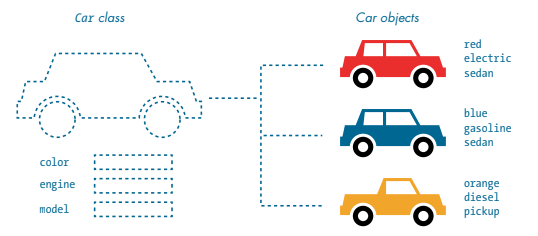
Variables + Functions = Object
Data (attributes) + Behavior (methods) = Object
Example: Car = (model, year) + (start(), stop())

class Car {
public:
string model;
int year;
void start() {
cout << "Car started";
}
};
Car myCar;
myCar.model = "Tesla";
myCar.year = 2024;
myCar.start();
Car car1, car2;
car1.model = "Honda";
car2.model = "BMW";
Car class with attributes: brand, yeardisplayInfo() to print detailsCar objects and call the method
Car car1, car2;
car1.brand = "Toyota";
car2.brand = "Ford";
car1.displayInfo();
car2.displayInfo();
Why model entities in OOP?
<!-- Example: Vehicles and Cars -->
Concept: Inheritance
+-----------+ +-----------+
| Vehicle | <---- | Car |
+-----------+ +-----------+
| brand | | doors |
| honk() | | honk() |
+-----------+ +-----------+
Concept: Composition
+-----------+ +-----------+
| Car | <---- | Engine |
+-----------+ +-----------+
| brand | | hp |
| doors | +-----------+
| engine | // Car "has-a" Engine
+-----------+
Concept: Inheritance
+----------------+ +----------------+
| FarmEquipment | <-- | Tractor |
+----------------+ +----------------+
| manufacturer | | horsepower |
| start() | | start() |
+----------------+ +----------------+
Concept: Composition
+-------------+ +------------+
| Tractor | <----- | Plow |
+-------------+ +------------+
| manufacturer| | type |
| engine | +------------+
| plow | // Tractor "has-a" Plow
+-------------+
Concept: Inheritance
+----------------+ +----------------+
| MedicalDevice | <-- | MRI |
+----------------+ +----------------+
| model | | resolution |
| operate() | | operate() |
+----------------+ +----------------+
Concept: Composition
+----------------+ +----------------+
| MRI | <-- | CoolingSystem |
+----------------+ +----------------+
| model | | capacity |
| power | +----------------+
| coolingSystem | // MRI "has-a" CoolingSystem
+----------------+
class Vehicle {
public:
string brand;
void honk() {
cout << "Beep!" << endl;
}
};
How do we instantiate Vehicle?
Vehicle v1;
v1.brand = "Toyota";
v1.honk();
class Vehicle {
private:
int speed;
public:
void setSpeed(int s){ speed = s; }
int getSpeed(){ return speed; }
};
Why use constructors?
class Vehicle {
public:
string brand;
Vehicle(string b){ brand = b; }
};
Vehicle v1("Honda");
cout << v1.brand;
When is a destructor called?
~Vehicle() {
cout << brand << " destroyed." << endl;
}
class Car : public Vehicle {
public:
int doors;
};
How do Car objects access Vehicle members?
Car c1;
c1.brand = "Ford";
c1.honk();
c1.doors = 4;
class Vehicle {
protected:
int year;
};
How does Car call Vehicle constructor?
class Car : public Vehicle {
public:
Car(string b, int y) : Vehicle(b) {
year = y;
}
};
class ElectricCar : public Car {
public:
int batteryCapacity;
ElectricCar(string b,int y,int d,int bc) : Car(b,y,d){
batteryCapacity = bc;
}
};
How do we set all attributes for ElectricCar?
ElectricCar e1("Tesla",2025,4,75);
cout << e1.brand << ", ";
cout << e1.doors << ", ";
cout << e1.batteryCapacity << endl;
class Car : public Vehicle {
public:
void honk() {
cout << "Car horn!" << endl;
}
};
Why use abstract classes?
class Vehicle {
public:
virtual void honk() = 0;
};
class Car : public Vehicle {
public:
void honk() override {
cout << "Car horn!" << endl;
}
};
Question: How does Car “have” an Engine?
class Engine {
public: int hp;
};
class Car {
Engine e; // Composition
};
class Car {
public:
static int count;
};
int Car::count = 0;
How to increment static counter?
Car::count++;
cout << Car::count;
namespace vehicles {
class Car {};
}
vehicles::Car c1;
How does SmartCar inherit GPS and MusicSystem?
class GPS {};
class MusicSystem {};
class SmartCar : public GPS, public MusicSystem {};
SmartCar s;
<!-- Vehicle → Car → ElectricCar -->
// Topic: Saving Data Streams to File
// Language: C++
// Streams in C++ represent data flow:
// input -> istream
// output -> ostream
istream: for reading dataostream: for writing datafstream: for both
#include <iostream>
#include <fstream>
using namespace std;
ifstream - input from fileofstream - output to filefstream - both directions
ifstream inFile;
ofstream outFile;
fstream file;
ofstream with filename
ofstream outFile("data.txt");
outFile << "Hello, stream!" << endl;
outFile.close();
ios::out - Write modeios::in - Read modeios::app - Append modeios::binary - Binary mode
ofstream file("log.txt", ios::app);
file << "New entry\n";
file.close();
ifstream to read filesgetline() to read line-by-line
ifstream inFile("data.txt");
string line;
while (getline(inFile, line)) {
cout << line << endl;
}
inFile.close();
is_open() or fail()
ofstream out("output.txt");
if (!out.is_open()) {
cerr << "Error opening file\n";
}
good() – No errorseof() – End of file reachedfail() – Logical errorbad() – Read/write error
if (in.fail()) {
cout << "Read failed!" << endl;
}
flush() forces buffer write
outFile << "Saving..." << flush;
ios::binary modewrite()
ofstream out("sensor.bin", ios::binary);
float value = 24.5;
out.write((char*)&value, sizeof(value));
out.close();
read()
ifstream in("sensor.bin", ios::binary);
float value;
in.read((char*)&value, sizeof(value));
in.close();
ios::app
ofstream file("log.txt", ios::app);
file << "New session started\n";
file.close();
rdbuf() to redirect
ofstream log("out.txt");
streambuf *old = cout.rdbuf(log.rdbuf());
cout << "Logging data...";
cout.rdbuf(old);
ofstream data("stream.txt");
for (int i = 0; i < 5; ++i)
data << "Reading " << i << endl;
data.close();
eof() is true
while (!in.eof()) {
getline(in, line);
cout << line << endl;
}
clear() to reset stream state
if (in.fail()) {
in.clear();
in.seekg(0);
}
ofstream log("sensor.csv");
log << "time,temp\n";
for (int i=0;i<10;i++)
log << i << "," << 20+i << endl;
log.close();
// Save, Read, Verify
// C++ file streams = reliable data persistence
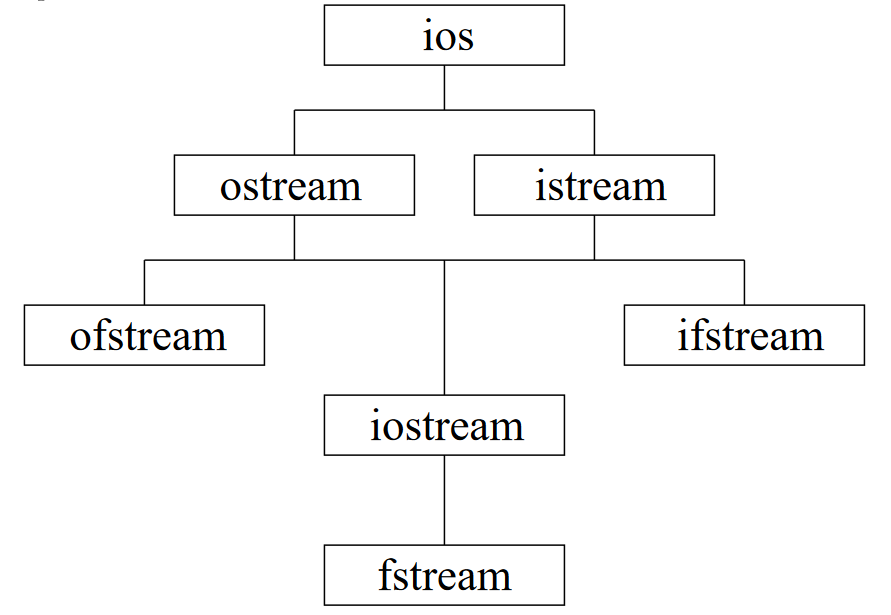
| Class | Type | Description |
|---|---|---|
| ios | Base | Base class for all stream operations |
| ostream | Output | Provides output operations (<<)< /td> |
| istream | Input | Provides input operations (>>) |
| ofstream | Output File | Write to files |
| ifstream | Input File | Read from files |
| iostream | Input/Output | Supports both reading and writing |
| fstream | File I/O | Read and write files |
// Input and output streams
#include
using namespace std;
int main() {
int x;
cout << "Enter a number: ";
cin >> x;
cout << "You entered: " << x << endl;
return 0;
}
#include
using namespace std;
ofstream outFile("data.txt");
outFile << "Hello, file!" << endl;
outFile.close();
#include
#include
using namespace std;
ifstream inFile("data.txt");
if(!inFile) {
cerr << "Error opening file!" << endl;
}
ofstream outFile("output.txt");
outFile << "C++ streams are easy!" << endl;
outFile << 42 << endl;
outFile.close();
ifstream inFile("output.txt");
string line;
while(getline(inFile, line)) {
cout << line << endl;
}
inFile.close();
ifstream inFile("data.txt");
if(inFile.good()) {
cout << "Ready to read." << endl;
}
if(inFile.eof()) {
cout << "End of file reached." << endl;
}
ofstream outFile("data.bin", ios::binary);
int x = 12345;
outFile.write(reinterpret_cast(&x), sizeof(x));
outFile.close();
ifstream inFile("data.bin", ios::binary);
int x;
inFile.read(reinterpret_cast(&x), sizeof(x));
cout << x << endl;
inFile.close();
ofstream outFile("data.txt", ios::app); // append
outFile << "More text" << endl;
outFile.close();
#include
cout << setw(10) << 123 << endl;
cout << fixed << setprecision(2) << 3.14159 << endl;
ofstream outFile("char.txt");
outFile.put('A');
outFile.write("Hello", 5);
outFile.close();
ifstream inFile("char.txt");
char c;
inFile.get(c);
cout << c << endl;
inFile.close();
#include
string data = "10 20 30";
istringstream ss(data);
int x;
while(ss >> x) {
cout << x << endl;
}
cout << "Hello, world!" << endl; // flushes
cout << "Hello again!";
cout.flush();
cout << hex << 255 << endl; // ff
cout << boolalpha << true << endl; // true
ofstream out("buf.txt");
streambuf* buf = out.rdbuf();
cout << "Using same buffer as file" << endl;
ifstream in("data.txt");
if(in.fail()) {
cerr << "Read failed!" << endl;
in.clear(); // reset state
}
ofstream out("file.txt");
out << "Some text" << endl;
out.close(); // important!
// Exercise code here
// Answer review in class
ofstream and fstream?ios::app mode?flush()?reinterpret_cast<char*> for binary data?
// Think and Discuss:
// - File modes
// - Error handling
// - Binary vs text data
numbers.txt
// TODO:
// 1. Create ofstream to write numbers
// 2. Close the file
// 3. Reopen with ifstream to read
// 4. Print contents to console
try, throw, and catch.
// Without Exception Handling
int main() {
int soilMoisture = 100;
int sensors = 0;
cout << soilMoisture / sensors; // crash!
}
try: risky code.throw: send out an error.catch: handle the error safely.
try {
// risky code
} catch (exceptionType e) {
// handle problem
}
try {
int totalYield = 500;
int acres = 0;
if (acres == 0)
throw runtime_error("No acres found!");
cout << totalYield / acres;
}
catch (const runtime_error& e) {
cerr << e.what();
}
💡 Question:
catch block matches the error type?
try {
throw "Sensor error!";
}
catch (int e) { cout << "Integer error"; }
catch (const char* e) { cout << e; }
catch(...) for unknown problems.
try {
throw "Data lost!";
}
catch (...) {
cout << "Unknown farm error.";
}
std::exception for simplicity.what().
catch (const exception& e) {
cerr << e.what();
}
class FarmError : public exception {
public:
const char* what() const noexcept override {
return "Farm system error!";
}
};
try {
throw FarmError();
}
catch (const FarmError& e) {
cerr << e.what();
}
float readTemp = -100;
try {
if (readTemp < -50)
throw runtime_error("Sensor reading invalid!");
cout << readTemp;
}
catch (const exception& e) {
cerr << e.what();
}
💡 Question:
try {
try { throw runtime_error("Pump error!"); }
catch (...) { throw; }
}
catch (const exception& e) {
cerr << e.what();
}
struct Crop {
~Crop() { cout << "Crop data cleaned up\n"; }
};
int main() {
try {
Crop c;
throw 1;
} catch (...) {}
}
ifstream file("weather.txt");
if (!file)
throw runtime_error("File not found!");
float soil = -10;
try {
if (soil < 0)
throw runtime_error("Invalid soil reading!");
cout << soil;
}
catch (const exception& e) {
cerr << e.what();
}
💡 Question:
void checkPump() { throw runtime_error("Pump offline!"); }
int main() {
try { checkPump(); }
catch (const exception& e) { cerr << e.what(); }
}

// Write a function checkEvenOdd(int n)
// Example:
// checkEvenOdd(4) → "Even"
// checkEvenOdd(7) → "Odd"
// Write a loop to calculate sumN(int n)
// Example:
// sumN(3) → 1 + 2 + 3 = 6
// sumN(5) → 15
// Complete findMax(int a, int b)
// Example:
// findMax(10, 7) → 10
// findMax(-3, 5) → 5
// Loop and multiply numbers from 1 to n
// Example:
// factorial(4) → 24
// factorial(0) → 1
// Compare secret and guess using if-else
// Example:
// guessGame(5, 5) → "Correct!"
// guessGame(5, 2) → "Try again"
// Print countdown from n to 0
// Example:
// countdown(3) → 3 2 1 0
// Use chained if statements for t
// Example:
// weatherMsg(5) → "Cold"
// weatherMsg(20) → "Warm"
// weatherMsg(30) → "Hot"
// Print 10 lines of n × i
// Example:
// table(3) →
// 3 × 1 = 3
// 3 × 2 = 6
// ...
// 3 × 10 = 30
// Use modulo and division in a while loop
// Example:
// digitSum(123) → 6
// digitSum(505) → 10
// Add +10 for wins, -5 for losses in loop
// Example:
// Input: w, w, l, w, l
// Final score → 20
// Write a function findSubstring(string text, string word)
// Return true if 'word' appears inside 'text'
// (you may use a loop or text.find())
// Example:
// findSubstring("programming", "gram") → true
// findSubstring("hello world", "bye") → false
if to check remainder
string checkEvenOdd(int n) {
if (n % 2 == 0)
return "Even";
else
return "Odd";
}
int sumN(int n) {
int sum = 0;
for (int i = 1; i <= n; i++)
sum += i;
return sum;
}
int findMax(int a, int b) {
if (a > b) return a;
return b;
}
int factorial(int n) {
int f = 1;
for (int i = 1; i <= n; i++)
f *= i;
return f;
}
string guessGame(int secret, int guess) {
if (guess == secret)
return "Correct!";
else
return "Try again";
}
void countdown(int n) {
while (n >= 0) {
cout << n << " ";
n--;
}
}
string weatherMsg(int t) {
if (t < 10) return "Cold";
else if (t < 25) return "Warm";
else return "Hot";
}
void table(int n) {
for (int i = 1; i <= 10; i++)
cout << n << " × " << i
<< " = " << n*i << endl;
}
int digitSum(int n) {
int sum = 0;
while (n > 0) {
sum += n % 10;
n /= 10;
}
return sum;
}
void miniBattle() {
int score = 0;
for (int i = 1; i <= 5; i++) {
char result;
cout << "Round " << i << " (w/l): ";
cin >> result;
if (result == 'w') score += 10;
else score -= 5;
}
cout << "Final score: " << score;
}
// Write a function findSubstring(string text, string word)
// Return true if 'word' appears inside 'text'
// (you may use a loop or text.find())
// Example:
// findSubstring("programming", "gram") → true
// findSubstring("hello world", "bye") → false
substr() Functionstring.substr(start, length)length is omitted → goes to end
#include <iostream>
#include <string>
using namespace std;
int main() {
string word = "programming";
cout << word.substr(0, 3) << endl; // "pro"
cout << word.substr(3, 4) << endl; // "gram"
cout << word.substr(7) << endl; // "ming"
}
find() and substr()
// Example:
string text = "hello world";
int pos = text.find("world");
string result = text.substr(pos); // "world"
#include <iostream>
#include <string>
using namespace std;
bool findSubstring(string text, string word) {
if (text.find(word) != string::npos)
return true;
else
return false;
}
// Example tests:
int main() {
cout << boolalpha;
cout << findSubstring("programming", "gram") << endl; // true
cout << findSubstring("hello world", "bye") << endl; // false
}
void greet(int n) {
if (n == 0) return;
cout << "Hello\n";
greet(n - 1);
}
void countdown(int n) {
if (n == 0) {
cout << "Done!";
return;
}
cout << n << " ";
countdown(n - 1);
}
// Recursion
void printR(int n) {
if (n == 0) return;
cout << n << " ";
printR(n - 1);
}
// Loop
for(int i=n;i>0;i--) cout << i << " ";
int fact(int n) {
if (n == 0) return 1;
return n * fact(n - 1);
}
int fib(int n) {
if (n <= 1) return n;
return fib(n-1) + fib(n-2);
}
void tailPrint(int n) {
if (n == 0) return;
cout << n << " ";
tailPrint(n - 1);
}
// Example: Tree traversal
void inorder(Node* root) {
if (!root) return;
inorder(root->left);
cout << root->val << " ";
inorder(root->right);
}
// Loop better for:
for (int i=0; i<1000; i++) doWork();
// Recursion better for:
searchTree(root);
Question:
Write a recursive function
find(int arr[], int n, int target, int i)
that searches for target in a 50-element array.
// Example dataset
int arr[50] = {
2, 4, 7, 9, 12, 15, 18, 21, 24, 27,
30, 33, 36, 39, 42, 45, 48, 51, 54, 57,
60, 63, 66, 69, 72, 75, 78, 81, 84, 87,
90, 93, 96, 99, 102, 105, 108, 111, 114, 117,
120, 123, 126, 129, 132, 135, 138, 141, 144, 147
};
// Function signature
int find(int arr[], int n, int target, int i);
#include <iostream>
using namespace std;
int find(int arr[], int left, int right, int target) {
if (left > right) return -1; // base case
int mid = (left + right) / 2;
if (arr[mid] == target) return mid;
if (target < arr[mid])
return find(arr, left, mid - 1, target);
else
return find(arr, mid + 1, right, target);
}
int main() {
int arr[50] = {
2, 4, 7, 9, 12, 15, 18, 21, 24, 27,
30, 33, 36, 39, 42, 45, 48, 51, 54, 57,
60, 63, 66, 69, 72, 75, 78, 81, 84, 87,
90, 93, 96, 99, 102, 105, 108, 111, 114, 117,
120, 123, 126, 129, 132, 135, 138, 141, 144, 147
};
int target = 81;
cout << "Found at index: " << find(arr, 0, 49, target);
}
// Headers and std setup
#include <cstdlib>
#include <ctime>
#include <iostream>
using namespace std;
// Forward look: functions handle small tasks
// - compMove(): random computer choice
// - checkPlayerMove(): validate input
// - compare(): who wins this turn?
// - standings & win checks: score and match end
srand(time(0)).rand()%3 → 0,1,2.
// Returns "Rock", "Paper", or "Scissors"
string compMove() {
string compMoveA;
int randomNumber = rand() % 3; // 0..2
switch (randomNumber) {
case 0: compMoveA = "Rock"; break;
case 1: compMoveA = "Paper"; break;
case 2: compMoveA = "Scissors"; break;
}
return compMoveA;
}
// Ensures player typed a valid word
bool checkPlayerMove(string a) {
bool okMove;
if (a == "Rock" || a == "Paper" || a == "Scissors") {
okMove = true;
} else {
okMove = false;
}
return okMove;
}
// Returns which side wins this round
string compare(string comp, string player) {
if ((comp=="Scissors" && player=="Paper") ||
(comp=="Paper" && player=="Rock") ||
(comp=="Rock" && player=="Scissors")) {
return "computer";
} else if (comp == player) {
return "tie";
} else {
return "player";
}
}
main() clean.
// Prints chosen moves
void roundSummary(string player, string comp) {
cout << "You chose " << player
<< ", the computer chose " << comp << '\n';
}
// Note: params are (player, computer) order
void currentStandings(int playerScore, int compScore) {
cout << "Player- " << playerScore
<< " Computer- " << compScore << '\n';
}
// a = computer round wins, b = player round wins
string checkWin(int a, int b) {
if (a == 2) return "Computer";
if (b == 2) return "Player";
return "nope"; // not yet decided
}
void finalStandings(int compTotal, int playerTotal) {
cout << "Final scores:\n"
<< "Player- " << playerTotal
<< " Computer- " << compTotal;
}
int main() {
srand(time(0)); // seed random once
int playerScoreR = 0, compScoreR = 0; // round scores
int playerTotal = 0, compTotal = 0; // match totals
string playerMove, compMoveCurrent, winner;
char again;
bool keepGoing = true; // replay loop
bool play = true; // per-match loop
// We'll use nested while-loops next...
checkPlayerMove.
while (keepGoing) {
while (play) { // one best-of-three
cout << "Make your move! (Rock, Paper, or Scissors)\n";
cin >> playerMove;
if (checkPlayerMove(playerMove)) {
compMoveCurrent = compMove(); // random computer move
// ... resolve round (next slide)
} else {
cout << "That's not a move!\n";
}
compare() to decide.
string outcome = compare(compMoveCurrent, playerMove);
if (outcome == "player") {
playerScoreR++;
winner = "Player";
roundSummary(playerMove, compMoveCurrent);
currentStandings(playerScoreR, compScoreR);
} else if (outcome == "computer") {
compScoreR++;
winner = "Computer";
roundSummary(playerMove, compMoveCurrent);
currentStandings(playerScoreR, compScoreR);
} else {
cout << "Players made the same move! No points!\n";
currentStandings(playerScoreR, compScoreR);
}
play=false).
// Did anyone win the best-of-three?
string matchWinner = checkWin(compScoreR, playerScoreR);
if (matchWinner == "Player" || matchWinner == "Computer") {
cout << matchWinner << " wins!\n";
if (matchWinner == "Player") {
playerTotal++;
cout << "Player Wins!";
} else {
compTotal++;
cout << "Computer Wins!";
}
play = false; // end this match
}
} // end inner while (play)
// Reset per-round scores for the next match
playerScoreR = 0;
compScoreR = 0;
// Show running totals across matches
finalStandings(compTotal, playerTotal);
// Replay prompt
cout << "Round over! Would you like to play again? (Y/N)";
char again;
cin >> again;
if (again == 'Y' || again == 'y') {
play = true; // start a new match
} else {
keepGoing = false; // exit outer loop
}
}
return 0;
}
cin states.2 with a named constant.
// Example: named constant for match length
const int ROUNDS_TO_WIN = 2;
// Example: safe input (future exercise)
// if (!(cin >> playerMove)) { /* clear and re-prompt */ }
int add(int a, int b);
// name: add, params: (int, int)
void greet(string name); // parameter
greet("Alice"); // argument
double square(double x) {
return x * x;
}
void test(int x) {
x = 50; // affects only local copy
}
void update(int& x) {
x = 50; // changes caller's variable
}
int length(const string& s) {
return s.size();
}
void log(string msg, int level = 1);
int sum(int a, int b);
double sum(double a, double b);
int x = 10;
void test() {
int x = 5; // hides global x
}
pair getPair() {
return {3, 7};
}
bool isEven(int x) {
return x % 2 == 0;
}
// Returns true if n is prime
bool isPrime(int n) { ... }
void mix(int a, double b);
void mix(double b, int a); // different
int test() {
// no return → unsafe
}
void printLine() {
cout << "----------\n";
}
namespace mathTools {
int add(int a, int b) {
return a + b;
}
}
int x = mathTools::add(3, 4);
std::cout << "Hello";
std::string name = "Solo";
std::vector v = {1,2,3};
// Before namespaces
// cout lived in global scope
// After C++98
std::cout << "Now organized";
std::cout << "Enter age: ";
int age;
std::cin >> age;
using namespace std;
cout << "Shorter to write";
string s = "Hello";
using std::cout;
using std::string;
cout << "Clean style";
string name = "Solo";
std::vector data = {1,2,3};
std::sort(data.begin(), data.end());
int absolute(int n);
int countVowels(const std::string& text);
bool isDigit(char c);
int middleOfThree(int a, int b, int c);
bool endsWithPeriod(const std::string& s);
void scaleArray(int arr[], int size, int factor);
int wordCount(const std::string& s);
bool inRange(int value, int low, int high);
std::string extractUpper(const std::string& s);
void swapValues(int& a, int& b);
// Simple C function
int add(int a, int b){ return a + b; }What was C originally created for?
// C++ class intro
class Farm{}; Farm f;C++ extended C by adding…
// Assembly sample
mov eax, edi
add eax, esiWhich step comes right after C++ code?
int age;
cin >> age;
cout << age;Which object reads input?
int cropCount = 10;Which is a valid variable?
int a, b, c;Which is correct?
int moisture = 40;Why initialize?
double y = (double)5;Explicit cast uses…
int g=0; void f(){int x=5;}A local variable lives…
string crop = "Wheat";Access first letter with…
class Farmer{public:string name;};A class represents…
class Crop{}; class Corn: public Crop{};Inheritance means…
if(moisture>50) cout less than "Wet";Condition executes when…
for(int i=0;i<5;i++) cout less than i;A for loop runs…
while(x less than 5){x++;}While checks condition…
do{x++;}while(x less than 5);Do-while runs…
for(r) for(c) printNested loops are good for…
if(i==3) continue;continue means…
// istream/ostreamWhich writes output?
ofstream out("farm.txt");ofstream is for…
setw(10)setw changes…
istringstream ss("10 20");stringstream helps…
try{throw 1;}catch(...){}Exceptions prevent…
if(a>b)More paths means…
// Mini agri example
if(moisture < 30){ cout<<"Irrigate"; }What should a program do when moisture is low?
string.main().This program uses a simple setup: a Farmer class to store each player’s name and coins, small helper functions to initialize farmers, show the crop menu, read a player’s choice, map that choice to a coin reward, run each round, and finally print the winner after all rounds. The signatures keep the structure clean so the game logic in main() stays easy to follow.
#include <iostream> for cin / cout.#include <string> to store farmer names.using namespace std; to avoid writing std::.main() declared before main().
// Signantures and setup
class Farmer;
void initFarmer(Farmer& farmer, const string& name);
void printCropMenu();
int readCropChoice(const string& playerName);
int cropReward(int cropChoice);
int askNumberOfRounds();
void printRoundResult(const Farmer& p1, const Farmer& p2, int roundNumber);
void printFinalResult(const Farmer& p1, const Farmer& p2, int rounds);
void playSingleRound(Farmer& p1, Farmer& p2, int roundNumber);
class.
class Farmer {
};
Farmer groups together related data.name: used when asking for choices and scores.coins: starts at 0 and increases each round.
class Farmer {
public:
string name;
int coins;
};
Farmer object.
void initFarmer(Farmer& farmer, const string& name);
farmer.name.farmer.coins to 0 at the start of every game.Farmer& farmer passes the object by reference.const string& name avoids copying the string.
void initFarmer(Farmer& farmer, const string& name) {
farmer.name = name;
farmer.coins = 0;
}
void function, no return value.
void printCropMenu();
cout for all output.
void printCropMenu() {
cout << "Choose your crop (enter the number):\n";
cout << " 0 = Wheat (+2 coins)\n";
cout << " 1 = Corn (+3 coins)\n";
cout << " 2 = Cows (+4 coins)\n";
}
int.
int readCropChoice(const string& playerName);
playerName.int choice.choice is outside the valid range.choice value.
int readCropChoice(const string& playerName) {
int choice;
cout << playerName << ", enter 0, 1, or 2: ";
cin >> choice;
if (choice < 0 || choice > 2) {
cout << "Invalid choice, using Wheat (0).\n";
choice = 0;
}
return choice;
} int with the reward.
int cropReward(int cropChoice);
if statements (no complex logic).else as a default for Cows.
int cropReward(int cropChoice) {
if (cropChoice == 0) {
return 2; // Wheat
}
if (cropChoice == 1) {
return 3; // Corn
}
return 4; // Cows
}
int.
int askNumberOfRounds();
int askNumberOfRounds() {
int rounds;
cout << "How many rounds do you want to play (1-10)? ";
cin >> rounds;
if (rounds < 1 || rounds > 10) {
cout << "Invalid number, using 3 rounds.\n";
rounds = 3;
}
return rounds;
} const Farmer& to avoid copying.void).
void printRoundResult(const Farmer& p1,
const Farmer& p2,
int roundNumber);
const Farmer& because we only read data.
void printRoundResult(const Farmer& p1,
const Farmer& p2,
int roundNumber) {
cout << "\n=== End of round "
<< roundNumber << " ===\n";
cout << p1.name << " has "
<< p1.coins << " coins.\n";
cout << p2.name << " has "
<< p2.coins << " coins.\n\n";
}
const Farmer& for both farmers.void).
void printFinalResult(const Farmer& p1,
const Farmer& p2,
int rounds);
void printFinalResult(const Farmer& p1,
const Farmer& p2,
int rounds) {
cout << "\n=== Final result after "
<< rounds << " rounds ===\n";
cout << p1.name << ": "
<< p1.coins << " coins\n";
cout << p2.name << ": "
<< p2.coins << " coins\n";
if (p1.coins > p2.coins) {
cout << p1.name
<< " wins the farm game!\n";
} else if (p2.coins > p1.coins) {
cout << p2.name
<< " wins the farm game!\n";
} else {
cout << "It is a draw.\n";
}
} printRoundResult at the end of the round.
void playSingleRound(Farmer& p1,
Farmer& p2,
int roundNumber);
printCropMenu() once.readCropChoice for each farmer.cropReward.
void playSingleRound(Farmer& p1,
Farmer& p2,
int roundNumber) {
cout << "\n=== Round "
<< roundNumber << " ===\n";
printCropMenu();
int choice1 = readCropChoice(p1.name);
int choice2 = readCropChoice(p2.name);
int reward1 = cropReward(choice1);
int reward2 = cropReward(choice2);
p1.coins += reward1;
p2.coins += reward2;
printRoundResult(p1, p2, roundNumber);
} Farmer with 0 coins.for loop calling playSingleRound.printFinalResult at the end.
int main();
getline to accept spaces.initFarmer to set name and coins.askNumberOfRounds once.rounds and call playSingleRound.printFinalResult and return 0.
int main() {
Farmer p1;
Farmer p2;
cout << "Enter name for Farmer 1: ";
getline(cin, p1.name);
if (p1.name.empty()) {
p1.name = "Farmer 1";
}
cout << "Enter name for Farmer 2: ";
string name2;
getline(cin, name2);
if (name2.empty()) {
name2 = "Farmer 2";
}
initFarmer(p1, p1.name);
initFarmer(p2, name2);
int rounds = askNumberOfRounds();
for (int r = 1; r <= rounds; ++r) {
playSingleRound(p1, p2, r);
}
printFinalResult(p1, p2, rounds);
return 0;
} 
void printWelcome();
void printWelcome() {
cout << "==============================\n";
cout << " Thanksgiving Dinner Planner \n";
cout << "==============================\n\n";
}
string askHostName();
string askHostName() {
cout << "What is your name (the host)? ";
string name;
getline(cin, name);
if (name.empty()) {
name = "Host";
}
cout << "Welcome, " << name << "!\n\n";
return name;
}
int askGuestCount();
int askGuestCount() {
cout << "How many guests will come (1-20)? ";
int guests;
cin >> guests;
if (guests < 1 || guests > 20) {
cout << "Number out of range, using 4 guests.\n";
guests = 4;
}
cin.ignore(numeric_limits<streamsize>::max(), '\n');
return guests;
}
int askDishCount();
int askDishCount() {
cout << "How many different dishes (1-15)? ";
int count;
cin >> count;
if (count < 1 || count > 15) {
cout << "Number out of range, using 5 dishes.\n";
count = 5;
}
cin.ignore(numeric_limits<streamsize>::max(), '\n');
return count;
}
string askDishName(int index);
string askDishName(int index) {
cout << "Enter name for dish " << index << ": ";
string name;
getline(cin, name);
if (name.empty()) {
name = "Dish " + to_string(index);
}
return name;
}
vector<string> collectDishes(int count);
vector<string> collectDishes(int count) {
vector<string> dishes;
for (int i = 1; i <= count; ++i) {
string dish = askDishName(i);
dishes.push_back(dish);
}
return dishes;
}
void printMenu(const vector<string>& dishes);
void printMenu(const vector<string>& dishes) {
cout << "\nThanksgiving Menu:\n";
for (size_t i = 0; i < dishes.size(); ++i) {
cout << " " << (i + 1) << ". " << dishes[i] << "\n";
}
cout << "\n";
}
string pickRandomDish(const vector<string>& dishes);
string pickRandomDish(const vector<string>& dishes) {
if (dishes.empty()) {
return "No dishes available";
}
int index = rand() % dishes.size();
return dishes[index];
}
double estimateTurkeySize(int guestCount);
double estimateTurkeySize(int guestCount) {
const double poundsPerGuest = 1.5;
double total = guestCount * poundsPerGuest;
return total;
}
void printDinnerSummary(const string& host,
int guests,
double turkey);
void printDinnerSummary(const string& host,
int guests,
double turkey) {
cout << "\nDinner summary\n";
cout << "Host: " << host << "\n";
cout << "Guests: " << guests << "\n";
cout << "Turkey: " << turkey
<< " pounds (approx.)\n\n";
}
class Guest {
public:
string name;
bool eatsTurkey;
};
Guest g;
g.name = "Alice";
g.eatsTurkey = true;
Guest readGuest(int index);
Guest readGuest(int index) {
Guest g;
cout << "Guest " << index << " name: ";
getline(cin, g.name);
if (g.name.empty()) {
g.name = "Guest " + to_string(index);
}
cout << "Does " << g.name
<< " eat turkey (y/n)? ";
char answer = 'y';
cin >> answer;
cin.ignore(numeric_limits<streamsize>::max(), '\n');
g.eatsTurkey = (answer == 'y' || answer == 'Y');
return g;
}
void printGuestTurkeyChoices(
const vector<Guest>& guests);
void printGuestTurkeyChoices(
const vector<Guest>& guests) {
cout << "\nTurkey choices:\n";
for (size_t i = 0; i < guests.size(); ++i) {
const Guest& g = guests[i];
if (g.eatsTurkey) {
cout << g.name
<< " will eat turkey.\n";
} else {
cout << g.name
<< " prefers side dishes.\n";
}
}
cout << "\n";
}
void playRandomSuggestion(
const vector<string>& dishes);
void playRandomSuggestion(
const vector<string>& dishes) {
if (dishes.empty()) {
cout << "No dishes to suggest.\n";
return;
}
string suggestion = pickRandomDish(dishes);
cout << "Random dish suggestion: "
<< suggestion << "\n";
}
int main();
int main() {
srand(static_cast<unsigned int>(time(NULL)));
printWelcome();
string host = askHostName();
int guestCount = askGuestCount();
int dishCount = askDishCount();
vector<Guest> guests;
for (int i = 1; i <= guestCount; ++i) {
Guest g = readGuest(i);
guests.push_back(g);
}
printGuestTurkeyChoices(guests);
vector<string> dishes = collectDishes(dishCount);
printMenu(dishes);
double turkey = estimateTurkeySize(guestCount);
printDinnerSummary(host, guestCount, turkey);
playRandomSuggestion(dishes);
return 0;
}
bool isCoffeeHot(double temperature);int grindBeans(int grams);double brewCoffee(int strengthLevel);void addMilk(double amount);string selectBeanType(int choice);bool isCupFull(int currentLevel);double calculateCaffeine(int shots);void warmCup();string roastLevelDescription(string level);int refillWaterTank(int currentLevel);
// Example
double t1 = 72.5;
double t2 = 45.0;
bool hot1 = isCoffeeHot(t1); // true
bool hot2 = isCoffeeHot(t2); // false
// Example
int cups1 = grindBeans(25); // 2
int cups2 = grindBeans(7); // 0
// Example
double tMild = brewCoffee(1); // e.g. 3.0
double tStrong = brewCoffee(5); // e.g. 6.0
double tClamp = brewCoffee(8); // treated as 5
// Example
addMilk(30.0); // "Added 30 ml of milk"
addMilk(-10.0); // ignored, no change
// Example
std::string a = selectBeanType(1); // "Arabica"
std::string r = selectBeanType(2); // "Robusta"
std::string x = selectBeanType(9); // "Unknown"
// Example
bool full1 = isCupFull(180); // false
bool full2 = isCupFull(260); // true
// Example
double c1 = calculateCaffeine(1); // 80.0
double c2 = calculateCaffeine(3); // 240.0
double c3 = calculateCaffeine(-1); // 0.0
// Example
warmCup(); // "Warming cup..." then "Cup is warm."
// Example
std::string d1 = roastLevelDescription("light");
// "Bright and mild flavor"
std::string d2 = roastLevelDescription("dark");
// "Bold flavor with stronger bitterness"
// Example
int add1 = refillWaterTank(500); // 1500
int add2 = refillWaterTank(2100); // 0
Course Syllabus – Fall 2025
This course provides an introduction to programming with C++, covering both procedural and object-oriented approaches. Students begin with the fundamentals of variables, control flow, loops, arrays, and functions, then progress to advanced topics such as classes, inheritance, pointers, recursion, and exception handling.
C++, Compiler, Linker, Variables, Data Types, Constants, Operators, Assignments, Expressions, Conditionals, Branches, If/Else, Switch, Loops, For, While, Do-While, Arrays, Vectors, Strings, Functions, Parameters, Return Values, Scope, Objects, Classes, Encapsulation, Constructors, Destructors, Inheritance, Polymorphism, Virtual Functions, Streams, cin, cout, File I/O, Recursion, Call Stack, Pointers, References, Dynamic Memory, Exceptions, Try/Catch, Error Handling, Header Files, Namespaces, Standard Library, Templates, STL, Iterators, Containers, Algorithm Library, Sorting, Searching, Compilation Process, Debugging, Testing, Code Reuse, Modularization, Maintainability.